
Then you are prompted for a display sample rate, which loaded data will
be resampled to before display. Lower samplerates are faster for
drawing, but of course less accurate. For many channels, such as
respiration, pulse or eda, a sample rate of 50 Hz is more than
sufficient. Other data types, like ecg or emg, need higher temporal
resolution (400 , 1000Hz respectively).

As in all other analysis types, when opening a raw data file, anslab
checks wether an *.m-file of the same name exists in the folder, where
the raw data file is located. If this is the case, the m-file is
evaluated as MATLAB-code, in order to read in segmenting information
contained in the m-file. If a timing variable is defined in this file,
you are prompted to choose the segment to read in, or to read in the
entire length of the file, ignoring the timing variable. If
no segmenting variable can be found or the m-file does not exist, you
can choose to load the entire file or the stop data import.

Then, anslab reads in header information of the file to let you choose
each channel to load from a list of channel labels found in the file.
For Vivologic files, the channel labels are fixed and comprise only
those traces, that are hardcoded in the viv-file. All other
calculated traces are not available to anslab.
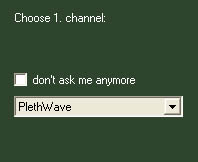
For each channel, you are additionally asked to choose, wether
the data type is digital (marker type) or analogue (any physiological
data channel). This is important as finding specific values in a signal
is much faster for digital channels, than for analog signal. Moreover,
a different type of resampling is used for marker type channels, to
avoid filter ripple. Generally, if you are loading a
psychophysiological data signal, do not set a channel as 'marker type',
for any other channel, choose 'yes'.

If you are loading averaged data segments, you can load a theoretically unlimited number of files and display them together. To do this, load files to a data 'slot', as set with the modifyied file edit box on the anslab menu window:
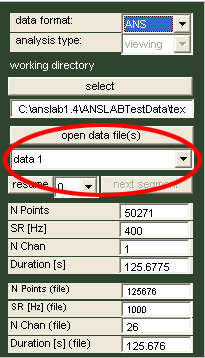
Files are then plotted together and labelled on a legend according to
their file names.
When the 'ANS'-file format is selected, switching to 'Event'-data mode,
will allow you to load corresponding statistical ANS-files, that are
related to the 'raw' signals. To this end, the 'open data
file(s)'-button is changed to 'open stats file(s)' as shown below:

You can load an arbitrary number of stats files. You should make sure
however, that f-values and t-values are not mixed, as this will disrupt
proper scaling. Stats-files are produced when running  statistical
tests (t-tests or ANOVAs) from the 'Calculate'-menu.
statistical
tests (t-tests or ANOVAs) from the 'Calculate'-menu.

You can import up to 4 RAW-type variables and 4 EVENT-type variables, that will be accessible in anslab at the chosen data slot. Activate the corresponding data slot, and select the variablename from the adjacent dropdown-box.
For RAW-signals, you additionally have to make sure, the sampling rate is correct, to get correct timing information. EVENT-type variables do not require a sampling rate, but a separate time vector, as they are, by definition, nonuniformly sampled variables. This timing variable is included in mat-files written by anslab and must be selected from the 'timing variable'-dropdownbox.